

1. Open the bot and press Start
Use the zosee button above and check that the handle is @zosee_bot. Press Start in Telegram.
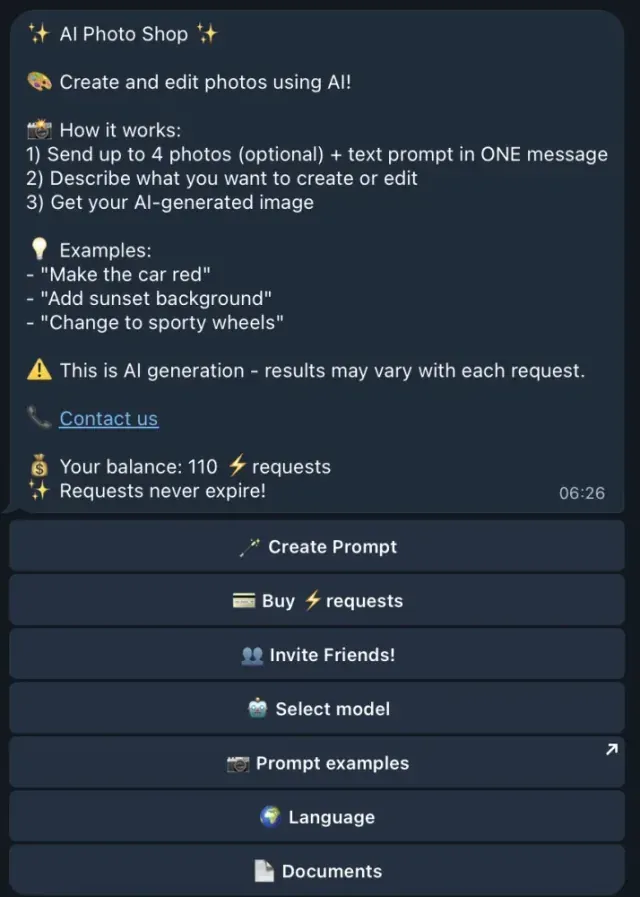
2. Claim the trial and check the model cost
The operator offers five trial credits once per account. Its claim instructions say to open Get free credits, join @zosee_channel, then return to the bot and tap I subscribed. Joining the channel alone does not grant the credits.
If the claim button is missing, the operator says the trial may already have been claimed on that account. Check your balance before requesting an image.
Use Select model or the current model control and choose a square format for the illustration below. The published prices range from one to six credits per image. Our five-credit examples show why this is not always five images.
3. Copy a prompt and send it
For a new image, send the first prompt as a message. For a photo edit, attach your photo and paste the second prompt into its caption. These original prompts have not been run through the bot here.
A square channel illustration
Create a square illustration for a Telegram post about organizing study notes. Show a wooden desk, three open notebooks and one blue pencil case. Use soft daylight, warm cream colours and simple paper-cut shapes. Leave the upper-left quarter clear so I can add a title later. No writing or logos in the image.
Edit a photo you already have
Keep the person, clothing and pose unchanged. Replace only the background with a plain warm cream wall. Match the existing lighting and keep natural edges around the hair. Do not add text or objects.
For edits, send the photo and caption together. zosee documents support for up to four photos in one request. Its photo instructions explain why a separate follow-up message will not be paired with the photo.
4. Check the result before requesting another
For the illustration, check that there are exactly three notebooks and that the upper-left area is clear. For the photo edit, compare the person and clothing with the original; changing only the background is the goal.
If one detail is wrong, describe that detail. If a fresh generation is required, keep the useful parts of your prompt and change only the part that failed.
Prefer another workflow? Return to the image-bot comparison. For ongoing ideas, browse our ChatGPT Prompts channel.